字体设置对比
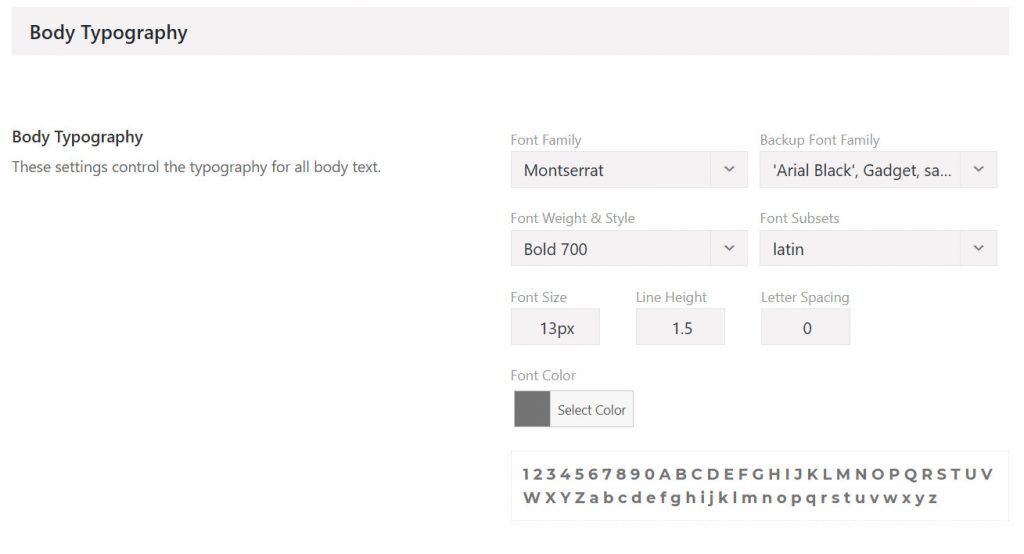
Avada 6.2.3 的字体设置是这样的:
Avada 7.0 的字体设置是这样的:
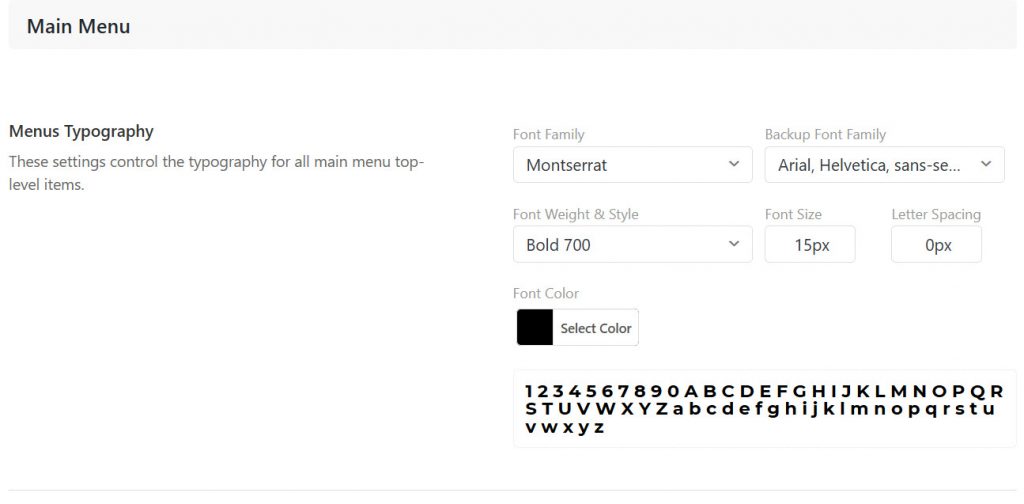
可以看到少了 subsets 设置,根据
The Latin subset is always included if available and need not be specified. Please note that if a client browser supports unicode-range (http://caniuse.com/#feat=font-unicode-range) the subset parameter is ignored; the browser will select from the subsets supported by the font to get what it needs to render the text.
谷歌字体开发文档
浏览器支持 unicode 范围选择,则会忽略 subset,没必要设置了。
生成代码和加载字体对比
以上文中的设置生成的代码最后网页加载的字体对比
Avada 6.2.3 :
/* latin */
@font-face {
  font-family: 'Montserrat';
  font-style: normal;
  font-weight: 700;
  src: local('Montserrat Bold'), local('Montserrat-Bold'), url(https://fonts.wp300.com/google/fonts-gstatic/s/montserrat/v14/JTURjIg1_i6t8kCHKm45_dJE3gnD-Px3rCs.woff) format('woff');
  unicode-range: U+0000-00FF, U+0131, U+0152-0153, U+02BB-02BC, U+02C6, U+02DA, U+02DC, U+2000-206F, U+2074, U+20AC, U+2122, U+2191, U+2193, U+2212, U+2215, U+FEFF, U+FFFD;
}
/* latin */
@font-face {
font-family: 'Montserrat';
font-style: normal;
font-weight: 400;
src: local('Montserrat Regular'), local('Montserrat-Regular'), url(https://fonts.wp300.com/google/fonts-gstatic/s/montserrat/v14/JTUSjIg1_i6t8kCHKm459WlhzSTh89Y.woff) format('woff');
unicode-range: U+0000-00FF, U+0131, U+0152-0153, U+02BB-02BC, U+02C6, U+02DA, U+02DC, U+2000-206F, U+2074, U+20AC, U+2122, U+2191, U+2193, U+2212, U+2215, U+FEFF, U+FFFD;
} Avada 7.0:
/* latin */
@font-face {
  font-family: 'Montserrat';
  font-style: normal;
  font-weight: 700;
  font-display: swap;
  src: local('Montserrat Bold'), local('Montserrat-Bold'), url(https://fonts.gstatic.com/s/montserrat/v14/JTURjIg1_i6t8kCHKm45_dJE3gnD-Px3rCs.woff) format('woff');
  unicode-range: U+0000-00FF, U+0131, U+0152-0153, U+02BB-02BC, U+02C6, U+02DA, U+02DC, U+2000-206F, U+2074, U+20AC, U+2122, U+2191, U+2193, U+2212, U+2215, U+FEFF, U+FFFD;
}
/* latin */
@font-face {
font-family: 'Montserrat';
font-style: italic;
font-weight: 700;
font-display: swap;
src: local('Montserrat Bold Italic'), local('Montserrat-BoldItalic'), url(https://fonts.gstatic.com/s/montserrat/v14/JTUPjIg1_i6t8kCHKm459WxZcgvz_PZ2jimrqw.woff) format('woff');
unicode-range: U+0000-00FF, U+0131, U+0152-0153, U+02BB-02BC, U+02C6, U+02DA, U+02DC, U+2000-206F, U+2074, U+20AC, U+2122, U+2191, U+2193, U+2212, U+2215, U+FEFF, U+FFFD;
} 可以看到,两版都加载了 Montserrat 字重 700 的正常字体,但是 6.2.3 却加载了字重 400 的字体,而 7.0 则加载了斜体。
7.0 版本更精确。
附:
在优化速度时,我 preload 了字体所以有记录,优化时只加载 Montserrat 字重 700 的正常字体,所以后来多加载了一个字体我就很好奇。
希望还在 support 期的用户能反馈下这个 bug,不要加载没用上的其它字重或者字变了。
2021-04-04_19:02:17 +0800 此项反馈在 7.3 版本已得到改进。